OPENSHORTS SELF-HOSTED STACK · DUAL-FORMAT CLIPPING SOP

GTA6 CLIPPING FACTORY: LOCAL AI STACK & VOLUME PLAYBOOK

The complete 14-minute SOP without the fluff: Self-host mutonby/openshorts (faster-whisper + Ollama qwen2.5:7b + YOLOv8 + FFmpeg) to cut 3–15 captioned clips per long video, publish 16:9 on X and 9:16 on Shorts/Reels, and run a disciplined 80–100 clip cadence spaced ≥2 hours apart.

NO SAAS FEES · OpenShorts Docker 1-LINE CAPTION · Kill AI paragraphs 8GB NVIDIA GPU · + Gemini API Key
X FEED · 16:9 LANDSCAPE02:55 RULE
16:9 landscape format for X feed
Keep full widescreen framing on X
9:16 REELSSHORTS
9:16 vertical mobile framing for YouTube Shorts and Instagram Reels
Pro-mode active speaker
INTERACTIVE VOLUME SIMULATOR & OPENSHORTS INSTALLER

Plan Your 80–100 Clip Sprint & Copy the Exact Docker Commands

Toggle daily upload cadence on the left to calculate days to the 80–100 breakout floor and ≥2h posting slots; switch tabs on the right to copy every verbatim OpenShorts command shown on screen (05:45–07:27).

1 · INTERACTIVE 80–100 CLIP SPRINT SIMULATOR (STEPS 6–7)
Days to 80 Clips40 DAYS
Days to 100 Clips50 DAYS
Expected Breakouts1–2 VIRAL
≥2-HOUR SPACING RULE (11:59 · NEVER DUMP 10 MIN APART)14 clips / wk
Slot 1 · 11:00 AM Slot 2 · 05:30 PM (+6.5h gap)

Caption Law (11:25): Write 1 single curiosity line—never paste a ChatGPT paragraph (“bro, nobody is going to read it”).

2 · COPYABLE OPENSHORTS TERMINAL INSTALLER (04:37–07:45)
# Verify CUDA GPU first (05:11)
nvidia-smi

# Clone OpenShorts & create writable dirs (05:45)
git clone https://github.com/mutonby/openshorts.git
cd openshorts
mkdir -p output uploads .cache/huggingface models
chmod -R a+rwX output uploads .cache models
# Verbatim .env config shown at 06:19
LLM_BASE_URL=http://ollama:11434/v1
LLM_MODEL=qwen2.5:7b
TRANSCRIBE_BACKEND=whisper
WHISPER_MODEL=large-v3-turbo
WHISPER_DEVICE=cuda
WHISPER_COMPUTE=float16
FFMPEG_ENCODER=auto
MAX_CONCURRENT_JOBS=1
GEMINI_MODEL=gemini-3.1-flash-lite
# Pull local moment-picking LLM (06:53)
docker compose up -d ollama
docker exec openshorts-ollama ollama pull qwen2.5:7b

# Fix Remotion lockfile (05:45) & YOLO weights perms (07:27)
# Inside render-service: npm install --package-lock-only --save-exact
chmod a+r yolov8n.pt
docker compose restart
COMPLETE CHRONOLOGICAL RUNBOOK (00:00 → 13:55)

All 7 Steps & 10 Timestamps Mapped With Actual 4K Frames

Every actionable detail from start to finish—no rewinding required.

00:00 – 04:28 · STEPS 1–4 · NICHE, HANDLES, DUAL-FORMAT & SOURCES

Set Up Clean GTA6 Pages & Source Viral Long Videos (No PS5 Needed)

  • 02:02 Handle Naming: Pick obvious niche handles like @GTAClips or @GTATrending across YouTube, Instagram, Facebook, and X.
  • 02:55 Dual-Format Rule: Export the exact same clip as 16:9 Landscape for X and 9:16 Vertical for Reels/Shorts/FB.
  • 03:13 Sourcing Content: Search trending GTA6 trailers, creator reactions, and leak breakdowns on YouTube—zero gameplay capture or PS5 required.
04:29 – 07:45 · STEP 5A · SELF-HOSTED OPENSHORTS DOCKER STACK

Deploy Local AI Clipping Pipeline on an 8GB NVIDIA GPU

Skips monthly SaaS clippers by combining faster-whisper (large-v3-turbo) for word-level captions, local Ollama (qwen2.5:7b) for viral hook selection, MediaPipe + YOLOv8 for speaker reframing, and FFmpeg NVENC encoding.

  • Set MAX_CONCURRENT_JOBS=1 to prevent 8GB VRAM out-of-memory crashes.
  • Run the two on-screen fixes (Remotion lockfile + chmod a+r yolov8n.pt) before restarting Docker Compose.
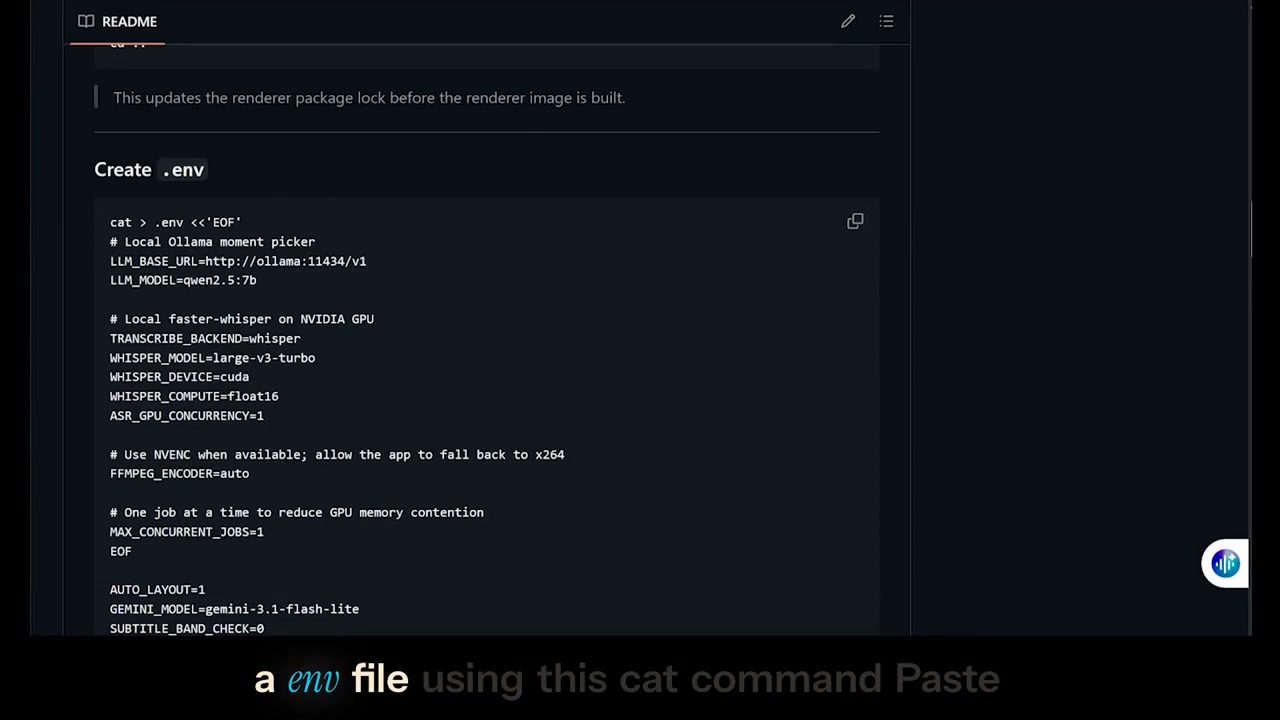
OpenShorts .env file shown at 06:19
06:19 · Exact .env config (qwen2.5:7b + large-v3-turbo + gemini-3.1-flash-lite)

07:45 – 10:29 · STEP 5B · OPENSHORTS WEB UI, AUTO-POST & MOBILE NOTE

Generate 3–15 Captioned Clips Per Video (+ Retention Warning)

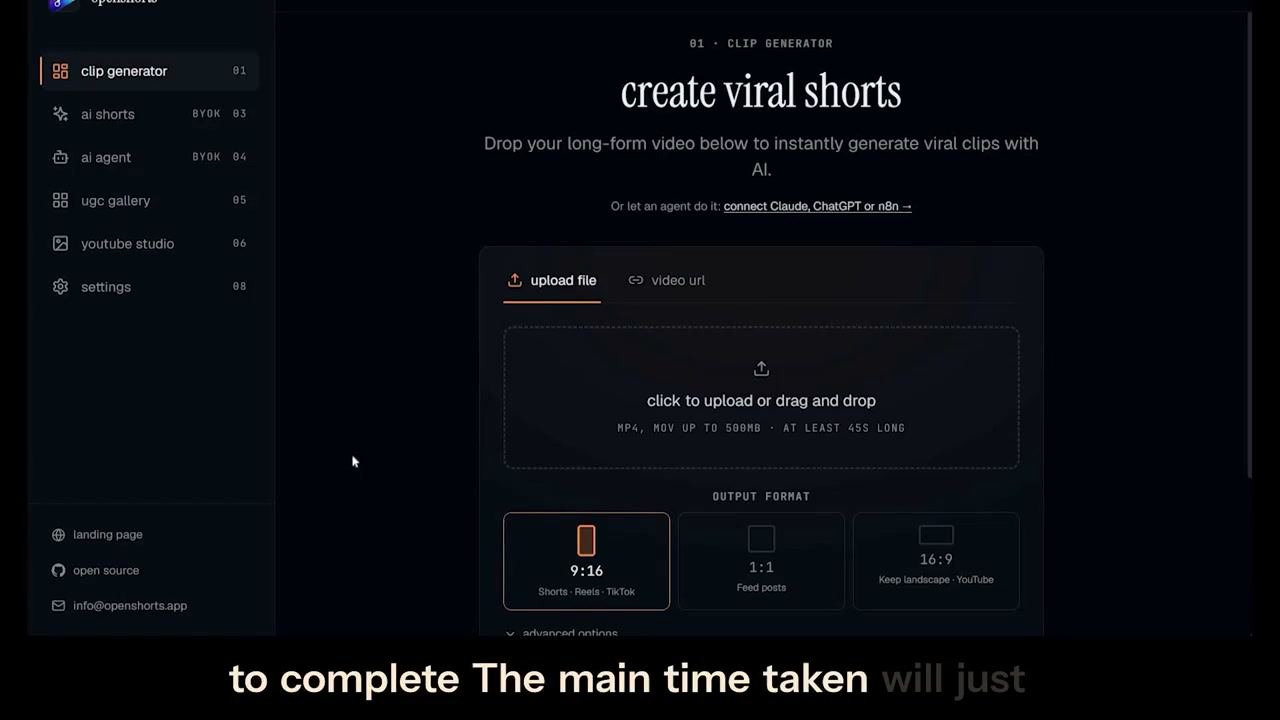
  • Drop MP4/MOV (up to 500MB, ≥45s) or paste a YouTube URL; pick 9:16, 1:1, or 16:9.
  • Auto-Delete Warning (09:09): Clips expire after 1 day unless you download them or raise JOB_RETENTION_SECONDS.
  • Auto-Post & Mobile (08:35 & 09:42): Optional Upload-Post API (free tier = 10 posts/mo); mobile-only creators cannot run local Docker GPU and must use mobile/cloud clippers.
OpenShorts clip generator web interface
08:01 · Local OpenShorts UI with 9:16 / 1:1 / 16:9 selectors & Pro-Mode reframing
10:30 – 13:55 · STEPS 6–7 · CONSISTENCY, 3 PAYOUT STREAMS & NUMBERS GAME

Push Past 80–100 Clips & Stack Three Revenue Streams

  • 10:51–11:59 Cadence: 1–2/day → 2–3/day after 1–2 weeks, spaced ≥2 hours apart with 1-line curiosity captions.
  • 12:33 Three Monetization Streams: (1) Platform views payouts (YouTube, FB, X), (2) Brand promotions/sponsorships, (3) Launching your own brand on the audience.
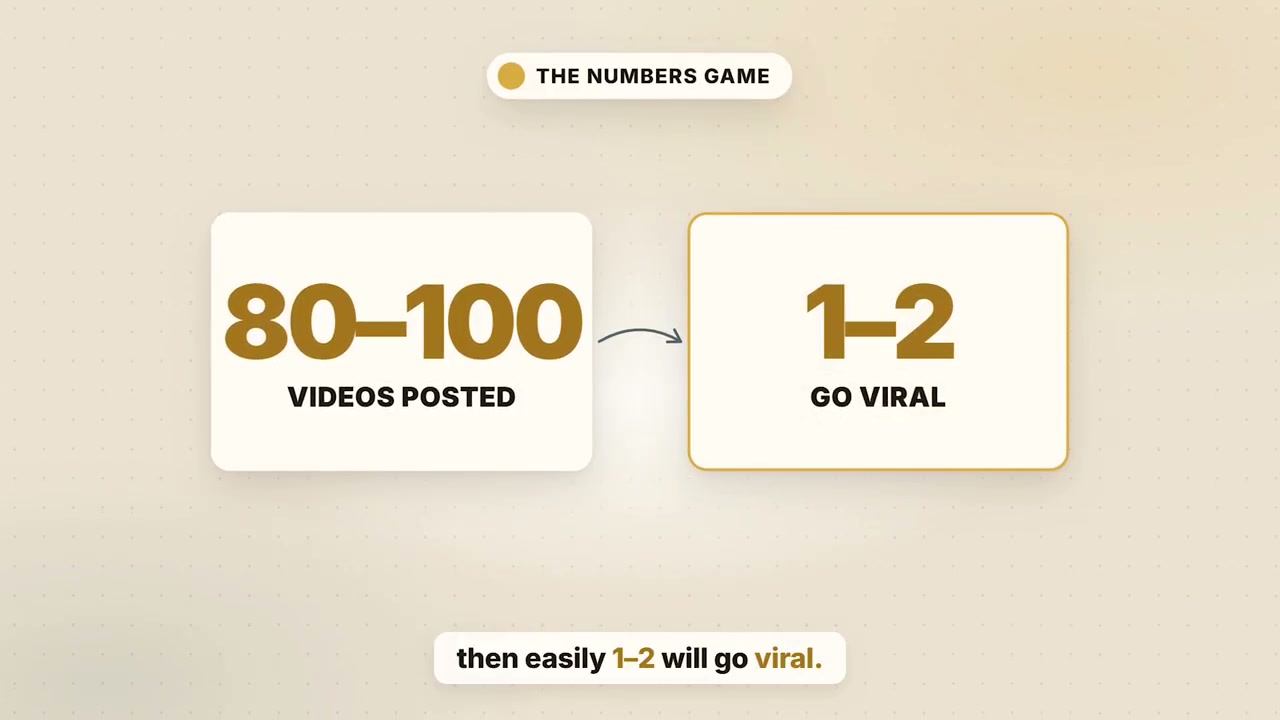
  • 13:07 Realistic Volume Floor: Expect 80–100 clips posted → 1–2 viral breakouts.
80-100 videos posted leads to 1-2 going viral
13:07 · The Numbers Game: 80–100 consistent uploads to catch 1–2 breakout clips

Verified Hardware & API Prerequisites (README 04:37)

GPUNVIDIA GPU (8 GB VRAM comfortable) for CUDA Whisper, Ollama & NVENC
OS / DockerUbuntu Linux (Docker + Compose v2) or Windows with Docker Desktop on WSL2
API KeysGoogle Gemini API Key (gemini-3.1-flash-lite); optional Upload-Post (10/mo free)

Factual Boundaries & Risk Audit

Income Claim$2,000–$5,000/month is the creator’s personal claim—not a verified or guaranteed payout.
Copyright RiskRe-uploading unedited trailers or creator streams risks demonetization or strikes unless transformative/licensed.
$0 RealityZero monthly SaaS fees—but assumes you already own an 8GB+ NVIDIA GPU PC and stay within free API quotas.